Upload any file.Get a permanentpublic URL.
One API request for uploads, delivery, and automation.
Turn any file into a public URL with one API call
Upload a file
Works With Your Existing Tools
Verified n8n Cloud node, public Zapier app, tested Make HTTP workflow, and native Pipedream component. No storage setup.
 n8n
Cloud verified ✓
n8n
Cloud verified ✓
 Make
HTTP module
Make
HTTP module
 Zapier
public app
Zapier
public app
 Pipedream
native component ✓
Pipedream
native component ✓
 Airtable
coming soon
Airtable
coming soon
 Monday.com
coming soon
Monday.com
coming soon
 ClickUp
coming soon
ClickUp
coming soon
 Notion
coming soon
n8n
Cloud verified ✓
Make
HTTP module
Zapier
public app
Pipedream
native component ✓
Airtable
coming soon
Monday.com
coming soon
ClickUp
coming soon
Notion
coming soon
Notion
coming soon
n8n
Cloud verified ✓
Make
HTTP module
Zapier
public app
Pipedream
native component ✓
Airtable
coming soon
Monday.com
coming soon
ClickUp
coming soon
Notion
coming soon
Use the verified n8n node or the public FilePost app on Zapier. Make uses its built-in HTTP module. Browse the integration library or open the Zapier setup.
Drop a file. Get the public URL now.
Choose any file up to 10 MB and enter your email. No password or credit card.
By uploading, you agree to the Terms and Privacy Policy. The URL works immediately and is kept for 24 hours; verify your email to make it permanent and unlock 15 uploads per month.
Check your email within 24 hours to keep this URL permanently.
Get your API key
Sign up free, no credit card. You get a key instantly. One 10 MB upload works before verification; verification unlocks 15 uploads/month and 50 MB files.
POST your file
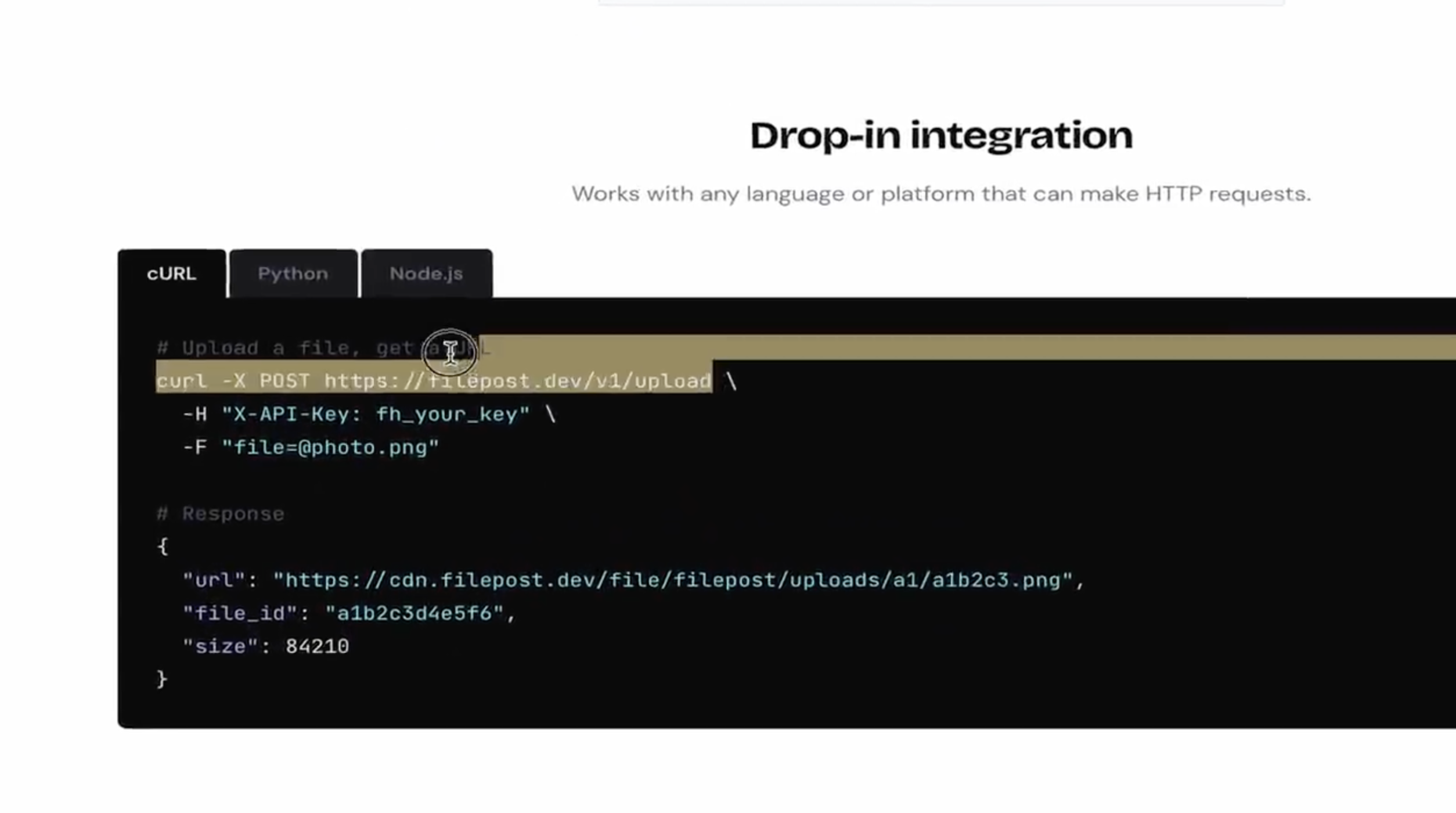
One HTTP request with your file attached. Works from curl, Python, Node, or any no-code tool.
Use the CDN URL
You get back a public CDN link. It keeps working until you delete it or configure expiry.
File Upload REST API: Drop-in Integration
Works with any language or platform that can make HTTP requests. Every upload is tied to an API key, plan limit, and account.


 People like you are already using it
What people are saying
"I send files to clients all the time. Every other service I tried either expired the link or required them to sign up. FilePost gave me a link that just works, weeks later. Simple."
"I build Make automations for clients who are not technical at all. With FilePost's module I can wire up file uploads in 5 minutes. They don't need to touch anything."
"Needed file uploads in a side project and did not want to deal with S3 and IAM policies again. FilePost was running in under 20 minutes. Been in prod for 4 months, zero issues."
Simple, Transparent Pricing
Start free. Upgrade when you need more. No hidden fees.
- 1 provisional upload before verification
- 15 / month after email verification
- 10 MB before verification, 50 MB after
- 2 GB storage
- Global CDN delivery
- REST API access
- 300 uploads / month
- 100 MB max file size
- 10 GB storage
- 10 intake links
- Global CDN delivery
- 1,500 uploads / month
- 200 MB max file size
- Unlimited storage
- Global CDN delivery
- Priority support
- 7,500 uploads / month
- 500 MB max file size
- Unlimited storage
- Global CDN delivery
- Priority support
Detailed comparison
| Limit | Free | Lite | Starter | Pro |
|---|---|---|---|---|
| Uploads / month | 1 provisional / 15 verified | 300 | 1,500 | 7,500 |
| Max file size | 10 MB provisional / 50 MB verified | 100 MB | 200 MB | 500 MB |
| Storage | 10 MB provisional / 2 GB verified | 10 GB | Unlimited | Unlimited |
| Bandwidth | Unlimited (all plans) | |||
| File retention | 24 hours provisional / permanent after verification | No automatic expiry by default | ||
| API rate limit | 10 req/s | 30 req/s | 50 req/s | 200 req/s |
Why Choose FilePost as Your File Upload API
No automatic expiry
URLs keep working until you delete the file, configure expiry, or the account is terminated.
Higher limits
Up to 7,500 uploads/month and 500 MB per file. Built for production workloads.
Full file management
List, get metadata, and delete files via API. Complete lifecycle control.
Global CDN
Files served via Cloudflare edge. Fast downloads worldwide, HTTPS by default.
Transparent limits
Every limit is documented. No hidden caps, no throttling surprises.
Interactive docs
Swagger/OpenAPI at /docs. Test every endpoint in your browser.
What Is a File Upload API?
A file upload API is a REST API that lets you upload files programmatically and receive a hosted URL in return. Instead of configuring cloud storage buckets, setting up IAM permissions, and wiring a CDN yourself, a file upload API handles the entire pipeline: you send a file via a POST request, and the API stores it, serves it through a global CDN, and returns a permanent public URL.
Developers use file hosting APIs like FilePost for common use cases including user avatar uploads, document management in SaaS apps, form file attachments, storing generated PDFs and reports, and piping files through automation workflows in tools like n8n, Pipedream, Zapier, and Make.
The typical alternative is setting up AWS S3 with CloudFront, which requires configuring buckets, IAM roles, CORS policies, and CDN distributions. A file upload REST API like FilePost reduces that to a single HTTP request. You POST a file, you get a CDN URL. No infrastructure to manage, no bandwidth fees, no expiring links.
FilePost works with any language or framework. Whether you're building with Python, Node.js, React, Next.js, or using cURL from the command line, you can upload files via the API in a single call. Browse the framework and workflow guides, or for a detailed comparison with AWS S3, see our File Upload API vs S3 guide.
File Intake Links
Generate a shareable upload link. Give it to clients, teammates, or embed it in a form. They upload, you get a webhook with the CDN URL. No auth needed on their end.
# Create an intake link
curl -X POST https://filepost.dev/v1/intake-links \
  -H "X-API-Key: fh_your_key" \
  -H "Content-Type: application/json" \
  -d '{"label": "Client photos", "webhook_url": "https://yourapp.com/hook"}'
Get back a branded upload page at filepost.dev/u/abc123 and share it with anyone.
File Upload API: Frequently Asked Questions
What is FilePost?
FilePost is a file hosting API that lets developers upload any file via a simple REST API call and receive an instant public CDN URL. It eliminates the need to configure S3 buckets, storage permissions, or CDN infrastructure. Files are stored on Backblaze B2 and served globally through Cloudflare's CDN with HTTPS encryption.
How do I upload a file using the REST API?
Send a POST request to https://upload.filepost.dev/v1/upload with your file as multipart form data and your API key in the X-API-Key header. The file upload REST API returns a JSON response containing the permanent public CDN URL for your file. The entire process takes one HTTP request. See our REST API file upload guide for code examples in cURL, Python, Node.js, and Java.
Is there a free tier?
Yes. The free plan starts with one provisional 10 MB upload before verification. Verify your email within 24 hours to keep it permanent and unlock 15 uploads per month, 50MB max file size, 2GB storage, and CDN delivery. No credit card required. Paid plans start at $4/month (Lite: 300 uploads) up to $29/month (Pro: 7,500 uploads).
What file types are supported?
FilePost accepts any file type: images (PNG, JPG, WebP, SVG), PDFs, documents (DOC, DOCX), videos (MP4, WebM), archives (ZIP, RAR), code files, and more. There are no restrictions on file formats. The file upload API handles the storage and CDN delivery regardless of file type.
How long are files stored?
Files have no automatic expiry by default. URLs keep working until you delete the file, configure expiry, or the account is terminated.
Can I use the file upload API with n8n, Pipedream, Zapier, or Make?
Yes. FilePost works with automation platforms including Zapier, n8n, Pipedream, Make, Airtable, and any webhook-based workflow. FilePost has a public Zapier app, a verified n8n Cloud community node, a native Pipedream component, and a tested Make HTTP-module workflow.
How is FilePost different from AWS S3?
FilePost is a managed file upload API that replaces the S3 + IAM + CloudFront stack with a single API call. No bucket configuration, no IAM roles, no CDN setup. S3 gives you more flexibility for complex object storage needs, but if your use case is "upload a file, get a public URL," FilePost is simpler, faster to integrate, and has no bandwidth fees. Read our full File Upload API vs S3 comparison.
What is the best file upload API for developers?
The best file upload API depends on your use case. For simple upload-and-serve workflows, FilePost offers the fastest integration: one POST request, one CDN URL. For image transformations, Cloudinary is strong. For full object storage, AWS S3 is the standard. FilePost is designed for developers who want the simplest possible API without managing infrastructure. See our comparison of the top file hosting APIs.
How do I upload files with Python or JavaScript?
With Python, use the requests library to POST your file to the FilePost API. With JavaScript/Node.js, use fetch or axios with FormData. Both take under 5 lines of code. See our guides for Python file upload and React/Next.js file upload with full code examples.